Can a solar-powered camera work without wires or WiFi? The answer is yes-and their market is booming. According to recent industry data, the solar security camera market is expected to reach USD 3.9-4.1 billion by the end of 2025, growing around 10-15% year over year. This surge reflects the rising global demand for sustainable, off-grid monitoring solutions that combine solar power with smart security technology.
As solar cameras evolve, one question keeps coming up: Which is better-4G Solar Security Camera or Solar WiFi Camera? Each type has its own strengths depending on where and how you use it.

In this guide, we’ll break down the 7 key differences between 4G solar security cameras and solar WiFi cameras, covering everything from coverage and installation range to reliability, video quality, and overall cost. By the end, you’ll know exactly which option fits your property, network setup, and long-term budget.
Overview of 4G Solar Security Cameras vs. Solar WiFi Cameras
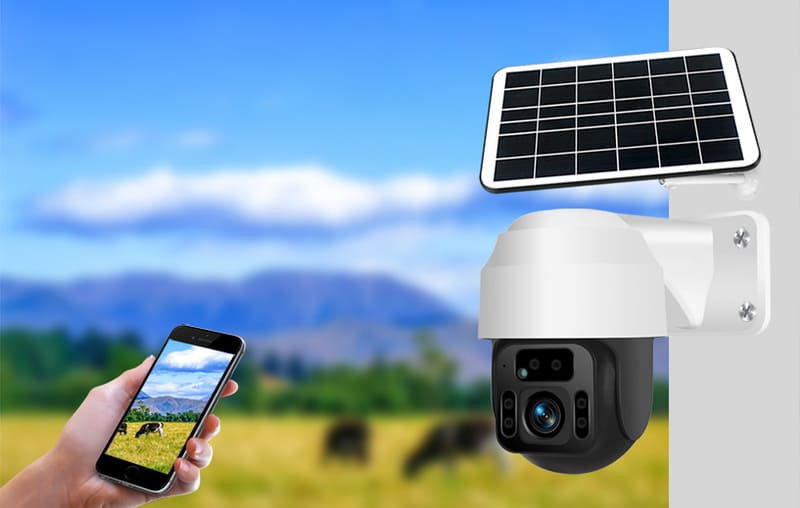
Both 4G solar security cameras and solar WiFi cameras are part of a growing shift toward wire-free, energy-efficient surveillance systems. These cameras use built-in solar panels and rechargeable batteries to stay powered continuously, even in outdoor or off-grid locations.
The main difference lies in how they connect to the internet. 4G solar security cameras use a SIM card to transmit data through cellular networks, allowing remote access without WiFi. In contrast, solar WiFi cameras connect directly to your home or business WiFi network, offering easier setup in areas with stable internet coverage.
Feature-wise, both types typically include motion detection, color night vision, two-way audio, and mobile app control. You can store footage locally via microSD card or through cloud storage for remote access.
In general, 4G solar security cameras are ideal for remote areas, farms, and construction sites, while solar WiFi cameras are better suited for homes, driveways, and small businesses where WiFi is readily available.

1. Coverage & Installation Range: 4G vs WiFi Solar Security Cameras
4G Solar Security Camera Coverage
4G solar security cameras use a SIM card to connect to the 4G/LTE cellular network. You don’t need WiFi or a fixed internet line. You can install them anywhere with a cellular signal. This includes remote or off-grid areas, think farms, cabins, wildlife monitoring sites, and construction zones.
Solar WiFi Camera Coverage
Solar WiFi cameras need a stable 2.4GHz or 5GHz WiFi signal from your home or property router. Your WiFi router’s reach limits their installation range.
Typical WiFi camera range:
Indoors or with obstacles: I recommend staying 20–30 meters from the router for a stable connection.
Open outdoor spaces: Can reach up to 50–100 meters if unobstructed.
Walls, thick trees, and buildings reduce WiFi range significantly.
WiFi solar cameras work best near a reliable router. They suit homes, driveways, storefronts, or garages close to the main internet source.

2. Installation Process: 4G Solar Security Camera vs Solar WiFi Camera
Installing a 4G solar security camera differs from installing a solar WiFi camera. The main differences are network type and setup needs.
4G Solar Security Camera Installation Steps
- SIM Card Integration: Insert a nano or micro SIM card with an active data plan. You’ll find a sealed port for this. The sealed design keeps water out.
- App Pairing: Download the manufacturer’s mobile app like V380 Pro or SEHMUA. Create an account. Add the camera to your device list for monitoring and remote control.
- Solar Panel Setup: Mount the solar panel where it gets direct sunlight all day. I recommend checking the sun path first. Angle and position matter a lot for charging power.
- Initial Charging: I suggest charging the battery with a power adapter before relying on solar. This gives you a full starting charge.
- Mounting the Camera: Fix the camera at 2.5–3 meters high. Use the arm mounts and hardware that come with it. You may need to drill some holes.
- Optional Storage: Insert a microSD card (Class 10, 8–128GB works best) if you want local video storage.
- Test & Fine-Tune: Open the app’s live view. Adjust the lens to cover your target area. I like PTZ models like the Manshur 4G LTE Dual Lens Solar PTZ. You can control the direction remotely.
Solar WiFi Camera Installation Steps
- WiFi Connection Setup: Check for a strong 2.4GHz WiFi signal in your install area. You’ll connect through the mobile app first.
- App Pairing: Use the same pairing process as 4G cameras. Connect the camera to your home network during setup.
- Solar Panel Positioning: Place the panel in a sunny spot. Adjust the angle for maximum sunlight.
- Mounting the Camera: Mount the camera at 2.5–3 meters high. Use the brackets, screws, or frames provided.
- Wire Management: Hide power and data cables if you can. Protect and seal all wiring against water for outdoor installs.
- Testing: Adjust the camera’s view in the app. Check the WiFi signal strength at the install point. Make sure motion detection covers all areas you need.
3. Reliability: 4G Solar Security Cameras vs Solar WiFi Cameras
A security camera’s reliability depends on two things: its network connection and power source. It is wise to consider this before you choose between 4G solar security cameras and solar WiFi cameras.
4G Solar Security Camera Reliability
Independent Connectivity: 4G solar security cameras use SIM cards. They connect through 4G/LTE cellular networks. With sunlight and mobile signal, these cameras stay online. No WiFi needed. No fixed internet required.
Power Outage Protection: Power cuts happen. Internet fails. But 4G solar cameras keep working. Their solar panels create power on their own. Cellular networks stay active in most cases.
Consistent Monitoring: Based on my experience, 4G solar cameras work great for monitoring caravans, tents, camper vans, and remote farms (like 20,000-hectare properties). I suggest them for gates, sheds, construction sites, and temporary setups.
Emergency Ready: Storm blackouts stop WiFi cameras. They lose power or internet. A 4G solar camera keeps recording. It deters theft. You get critical evidence. Real-time alerts reach you during emergencies.
Solar WiFi Security Camera Reliability
WiFi and Power Dependent: Solar WiFi cameras need a strong 2.4GHz WiFi connection. Walls block signals. Trees interfere. Distance matters. Network congestion disrupts them.
Vulnerable During Outages: Your home WiFi goes down? The camera goes down. Electricity fails? WiFi routers stop. The cameras disconnect.
Location Limits: I like these for urban or suburban homes. They need stable backup power. They need strong WiFi networks that you can maintain with ease.
Cost Savings: These cameras cut data costs. No SIM charges each month. Adding them to your home network is simple. But reliability drops fast during network or power problems.
Factors Affecting Both Types
Solar Panel Performance: Both 4G and WiFi solar cameras need good solar panels. Panel size matters. Panel efficiency matters. Position them right. Clean them often. This improves camera uptime in harsh weather.
Environmental Considerations: Snow affects all solar cameras. Rain impacts them. Extreme heat or cold changes solar output. Battery performance drops in bad weather.
4. Power and Battery: 4G Solar Security Cameras vs Solar WiFi Cameras
Power Source: Battery & Solar Panel Specs
4G Solar Security Cameras
These cameras use high-capacity built-in Li-ion batteries. Capacities range from 9,000 mAh to 30,000 mAh. Take the LS-4GS50 4G Camera as an example. It features a massive 30 Ah battery. This makes it suitable for long-term use.
Most models have solar panels with 4W to 6W power output. This panel keeps the camera charged in remote locations. No power lines needed.
Solar WiFi Cameras
Batteries run between 6,000 mAh and 14,000 mAh. Based on my experience, these work well for most home or small business settings. You just need reliable WiFi and some sun.
Solar panel wattage sits in the 4W–6W range. This is similar to 4G models.
5. Video Quality & Features: 4G Solar Security Camera vs Solar WiFi Camera
4G Solar Security Camera: Professional Video & AI Features
Standalone High-Resolution Video:
4G solar security cameras work without local internet. They are a strong choice for remote or off-grid monitoring. Models like the Reolink Go PT Ultra delivers 4K 8MP (3840×2160) resolution. This ultra-sharp image quality gives you detailed video footage. It works well even in large outdoor areas. The Xega 4G camera supports 2K HD (3MP) resolution. It features pan & tilt (up to 355° horizontal, 90–140° vertical). This provides wide surveillance coverage.
AI Analytics & Smart Detection:
Most premium 4G cameras include advanced AI video analytics. These identify and tell apart people, vehicles, and animals. This means fewer false alarms. PIR human detection makes alerts more accurate. Motion events send instant notifications via mobile app. The cameras support two-way audio for real-time communication.
Color Night Vision & Storage Options:
Many 4G solar security cameras offer color night vision up to 25 meters. They use built-in spotlights or strong infrared LEDs. Local recording is simple with microSD support (up to 128GB). You can also choose cloud storage for off-site backups.
Battery and Power Innovations:
Battery capacities range from 9000mAh to 10,000mAh. Brands like Milesight offer large battery packs. These support 9 days of continuous video. In my experience, these cameras can run for weeks without sunlight in energy-saving modes.
Panels are often 5W solar units. Features like eco-display mode and dynamic sleep mode help extend uptime. Some systems offer standby up to 165 days.
Solar WiFi Security Camera: Local Streaming & Network Considerations
WiFi-Connected Video Quality:
Solar WiFi cameras match many 4G models. They offer strong 2K or 4K resolution. Wide-angle pan/tilt/zoom support is included. This gives clear footage for homes or business entrances. Night vision uses infrared and spotlights. You get color or black-and-white images.
Motion Detection & App Alerts:
Most WiFi solar cameras include PIR motion detection. They send real-time mobile notifications. But advanced AI event detection is often limited. It’s not as refined as in top 4G models.
Network Limitations & Streaming Stability:
Video quality and streaming depend on WiFi signal strength. Distance from your router matters too. Weak or saturated home networks can reduce video quality. They may introduce signal lag. Remote sites away from routers may not work well.
Power and Storage:
Battery size is in the 6000–10,000mAh range. Solar panels provide reliable charging if sunlight is enough. For video storage, you have options. MicroSD cards (up to 128GB) work well. Cloud backup is also available—similar to 4G models.
6. Storage Options & Data Costs: 4G Solar Security Cameras vs Solar WiFi Cameras
Storage and data costs matter a lot when you pick between a 4G solar security camera and a solar WiFi camera. Here’s how both types compare for real use and budget.
Local Storage: SD Card Comparison
4G Solar Security Cameras: Support microSD cards from 32GB up to 1TB. Enterprise models like the Milesight SP111 support this range.
- 32GB SD card: Stores about 6.25 days of continuous 24-hour footage.
- 64GB SD card: Stores about 12.5 days.
- 128GB SD card: Stores about 25 days.
- 1TB cards enable months of storage in enterprise settings.
The system uses loop recording when the SD card fills up. Older files get overwritten.
Solar WiFi Security Cameras
- Typical microSD support ranges from 32GB to 256GB.
- Store around 7–30 days of motion-triggered events. This depends on activity level and card size.
- Like 4G models, these use loop recording to maximize storage space.
Cloud Storage & Data Costs
4G Solar Security Cameras
Cloud storage available, often for $3–$10/month per camera.
You’ll pay both a cellular data plan and the cloud fee if you select cloud backup.
Cloud uploads: Average 0.4GB/day for regular uploads.
Live viewing: Consumes about 0.2–0.4GB/day in addition to uploads.
Remote setups need more investment. But they stay online even if your power or WiFi goes out.
Solar WiFi Security Cameras
Similar cloud storage features: costs $3–$10/month. But no mobile data charges if WiFi is stable.
Cloud connection fails if WiFi or house power is interrupted.
I recommend cloud if you need extra data security or multi-user access.
NVR & System Integration
Both camera types can integrate with NVRs or VMS. This gives centralized, large-capacity storage in multi-camera setups. SD and cloud storage work great for single or small setups. But businesses with multiple zones often use NVR. It makes management and backup easier.
7. Upfront and Ongoing Cost: 4G Solar Security Camera vs. Solar WiFi Camera
When comparing 4G and WiFi solar security cameras, cost plays a major role in long-term value and deployment decisions.
Upfront Cost Comparison
4G solar security cameras usually come with a higher initial investment. This is because of the built-in 4G/LTE module and SIM card support that enable independent connectivity. Typical prices for 4G models start higher than WiFi versions of similar quality. For example, mid-range 4G cameras like the Reolink Go Plus or Xiaomi Imilab provide about 85% of premium features at roughly half the cost of high-end 4G models.
In comparison, WiFi solar cameras are generally more affordable since they rely on existing home WiFi networks and simpler components. A typical four-camera setup costs around $800–$1,200 for solar systems (either 4G or WiFi), while traditional wired systems can reach $400–$600 without solar capability.
Ongoing Cost Breakdown
4G solar cameras require an active data plan for cellular access. Depending on your provider, a SIM plan typically costs $10–$30 per month, translating to around $240–$720 per year. Advanced AI motion detection helps manage data use efficiently, averaging 500MB–2GB per month for most users.
Solar WiFi cameras, by contrast, have no recurring network fees – they connect through your existing home internet.
Key Differences Summary Table: 4G Solar Security Camera vs Solar WiFi Camera
Aspect | 4G Solar Security Camera | Solar WiFi Camera |
|---|---|---|
Connectivity | SIM card, 4G/LTE cellular network | 2.4GHz/5GHz WiFi from router |
Deployment Location | Anywhere with 4G signal (remote/off-grid) | Areas with WiFi coverage (mainly indoor/outdoor near router) |
Ongoing Cost | Monthly data plan required | None, uses existing internet plan |
Security | Isolated from home network, less hackable | Possible WiFi hacking vulnerability |
Installation | Plug-and-play; independent | WiFi pairing setup required |
Video Quality | Limited by cellular bandwidth | Higher with strong WiFi |
Typical Data Use | 500MB–2GB/month (motion-activated) | No data cap; better for continuous streaming |
Power | Solar panel + 9000-30,000mAh internal battery | Same (solar + 6000-14,000mAh battery) |
Example Application | Remote monitoring (farms, construction) | Residential/retail (under WiFi signal) |
Choosing between a 4G Solar Security Camera and a Solar WiFi Camera ultimately depends on where and how you plan to use it. If your property is in a remote or off-grid area, a 4G solar camera offers unmatched independence with cellular connectivity and reliable solar power. If you already have a stable home or business network, a solar WiFi camera provides an affordable, easy-to-manage option with no ongoing data fees.
Both types deliver eco-friendly surveillance, powered entirely by the sun, with intelligent features like AI motion detection, night vision, and cloud storage. As solar-powered security continues to grow within the USD 4 billion global market, these cameras are becoming the new standard for modern monitoring.
At iCSeecam, we specialize in customizing and OEM manufacturing solar and 4G security cameras for brands, distributors, and e-commerce sellers worldwide – contact us build smarter, sustainable security solutions.