Are you wondering, “Do Ring Cameras record 24/7?” You’re not alone. Many homeowners invest in Ring for security, only to find the answer is more nuanced than a simple yes or no. While not all models offer this feature, true continuous recording is available for specific devices—if you know the right requirements.
In this complete guide, we’ll demystify everything you need to know. We will first detail which specific Ring camera models support 24/7 recording and the essential requirements, including the necessary Ring Home Premium subscription.
Then, we’ll walk you through the simple setup process in the Ring app and highlight key limitations to be aware of. Our goal is to give you the clarity needed to configure your system for non-stop surveillance and total peace of mind.

Introduction to the Ring Brand
Ring is a leading smart home security brand, established in 2013 and acquired by Amazon in 2018 for approximately $1 billion. Ring offers many security products, include smart doorbells, indoor cameras, outdoor cameras, alarm systems, and car security solutions.
Flagship Products and Technology
Doorbell Cameras: Ring’s main products are the Video Doorbell, Doorbell Pro, and newer models. They offer 1080p to 4K video. They perform well in low light. They have two-way audio. They detect motion accurately. I like how clear the video quality is, even at night.
Security Cameras: Ring makes cameras for different needs. The Spotlight Cam Pro, Floodlight Cam Pro, and Outdoor Cam Pro all serve different spaces. The Ring Car Cam works as a dashcam. It detects emergencies for car owners.
AI-powered Features: Ring uses artificial intelligence in smart ways. Familiar Faces recognition identifies people who visit often. The system can tell apart people, cars, and packages. The AI Search Party tool helps find lost pets. Based on my experience, these features save time and reduce false alarms.
Alexa Integration: Ring devices connect easily with Alexa since Amazon owns both. Alexa+ Greetings talks to visitors for you. It manages deliveries. It can scare off unwanted guests. You don’t need to be home for any of this.
Brand Strengths and Customer Experience
Easy Setup: Ring products install quickly. The mobile app is simple to use. You can watch live video. You get alerts right away. I suggest Ring if you’re not tech-savvy.
Customizable Security: You can choose what alerts you want. The system recognizes people, cars, and packages. You can set notifications to match your schedule. This flexibility makes Ring practical for different lifestyles.
Cloud Storage Plans: A subscription gives you up to 180 days of video storage. You can save videos. You can share them. You can review important moments. The system saves footage from doorbell presses and motion events.
24/7 Support: Ring supports customers all day, every day. You can call or chat. They offer a 30-day free trial of their premium plan. Ring specialists help you anytime you need it.
Advanced Imaging: Retinal Vision 4K gives you sharp images. It zooms 10x. AI makes the picture better. It works well even in poor lighting. I’m impressed by how clear the footage stays in darkness.
Complete Ecosystem: All Ring products work together. They connect with Amazon’s smart home system. Ring now makes car security products. They even created Astro, a home monitoring robot.
Ring combines technical innovation with strong customer support. The design focuses on what users need. I recommend Ring as a reliable choice for home and car security.

Do Ring Cameras Record 24/7?
Not all Ring cameras record video and audio 24/7. Some wired or plug-in models offer this feature. You also need a Ring Home Premium subscription to activate it (available as of late 2024).
Which Ring Cameras Support 24/7 Recording?
These Ring cameras enable continuous recording when plugged in or hardwired:
- Outdoor Cam (Stick Up Cam 3rd Gen), Outdoor Cam Plus, Outdoor Cam Pro
- Stick Up Cam Pro
- Indoor Cam (1st Gen, 2nd Gen, Pan-Tilt Indoor Cam)
- Floodlight Cam Wired Plus, Floodlight Cam Wired Pro
- Spotlight Cam Plus, Spotlight Cam Pro
* Ring video doorbells and all battery-powered cameras do not offer 24/7 recording.
Requirements for 24/7 Recording
- You must have a Ring Home Premium subscription to use continuous video recording.
- Each location can connect up to 10 eligible devices for 24/7 recording.
- The camera must be plugged into a continuous power source. Battery operation does not support this feature.
Cloud Storage and Data Usage
- Ring keeps recorded footage in the cloud for up to 14 days. To save videos longer, you need to download files to local storage.
- Video records and uploads at all times. Data usage increases a lot. Do you have limited bandwidth or a metered plan? Pay attention to possible extra internet costs.
Bandwidth, Compatibility, and Feature Limitations
- Continuous upload of video can affect your network. It may slow down other services if you have limited bandwidth.
- The 24/7 recording feature does not work with some existing Ring functions. You must turn off those features first.
- As of October 2025, some newer, hardwired Ring cameras support 24/7 recording. I suggest you check your specific model before subscribing or relying on this service.
Which Ring Cameras Offer 24/7 Continuous Recording?
Not all Ring cameras support 24/7 continuous video recording. Specific wired or plug-in models can do this. You must have the Ring Home Premium subscription. Here’s a detailed look at which Ring cameras deliver true continuous recording.
Ring Cameras That Support Continuous Recording
Do you want nonstop video surveillance? Choose from these models. But remember: 24/7 recording requires the camera to be plugged in or hardwired.
- Outdoor Cam (was Stick Up Cam 3rd Gen)
- Outdoor Cam Plus
- Outdoor Cam Pro
- Stick Up Cam Pro
- Indoor Cam (1st Gen and 2nd Gen)
- Pan-Tilt Indoor Cam
- Floodlight Cam Wired Plus
- Floodlight Cam Wired Pro
- Spotlight Cam Plus
- Spotlight Cam Pro
Battery-powered cameras and all Ring doorbells do not support 24/7 recording. This is true even with a subscription.
Feature Comparison: Indoor Cam vs Outdoor & Specialty Models
| Camera Model | 24/7 Recording | Wired/Plugged | Night Vision | Cloud Storage | |
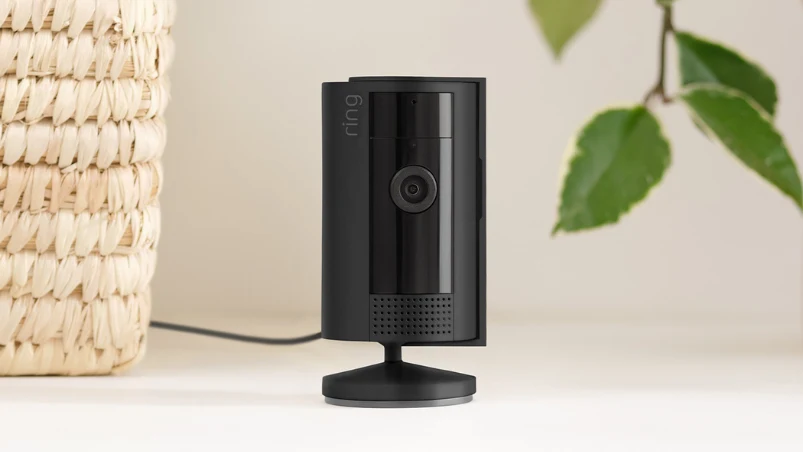 | Indoor Cam (1st, 2nd Gen) | Yes | Yes | Yes | Yes |
 | Stick Up Cam Pro | Yes | Yes | Yes | Yes |
 | Outdoor Cam Pro | Yes | Yes | Yes | Yes |
All models above have night vision and reliable cloud recording as standard features. If price matters to you, I recommend the Indoor Cam. It’s the most affordable option. It starts at $59.99. For outdoor security, I suggest you choose a model made to handle weather. These models also provide better coverage.
How to Make Ring Cameras Record 24/7?
I recommend setting up 24/7 continuous recording if you want full coverage from your Ring camera. You need to meet certain requirements and follow specific steps in the Ring app. This feature works for wired or plugged-in Ring camera models. You also need a Ring Home Premium subscription.
Requirements for 24/7 Recording
Compatible Devices: Select models support 24/7 continuous recording. These models include: Stick Up Cam (3rd Gen), Outdoor Cam Plus, Outdoor Cam Pro, Stick Up Cam Pro, Indoor Cam (1st & 2nd Gen), Pan-Tilt Indoor Cam, Floodlight Cam Wired Plus, Floodlight Cam Wired Pro, Spotlight Cam Plus, and Spotlight Cam Pro.
Continuous Power Source: Your camera must be plugged in or hardwired. Battery-powered cameras don’t support this feature.
Ring Home Premium Subscription: You must have an active subscription.
Device Limit: Each location supports up to 10 devices for 24/7 recording.
Cloud Storage: Ring saves recordings in the cloud for up to 14 days.
Data Usage: Your internet usage will increase. I suggest you check your network capacity first. Also, check if your provider has data limits.
Step-by-Step Set Up 24/7 Continuous Recording on Ring Cameras
- Open the Ring app and access the main dashboard.
- Tap the more icon (•••) next to your desired device.
- Go to Device Settings.
- Select Video Settings.
- Tap Recording Mode.
- Choose 24/7 Recording and complete the prompts.
- If you want, toggle Audio Streaming and Recording on or off.
- Tap Continue to confirm activation.
Key Features and Limitations
Feature Interaction: Enabling 24/7 recording will disable Pre-Roll and Snapshot Capture features. This happens right away.
Indicator Light: The camera’s blue indicator light stays on all the time. This reminds you that it’s recording.
Playback: You can view footage in the app. Use the zoomable, minute-by-minute timeline. Download specific moments, up to 10 minutes per clip.
Event Marking: Events like Motion, Person Detection, Live View, or Linked Device Events show up as marked points on the timeline. I find this makes it easy to access important moments fast.
Integration with Ring Modes and Controls
Mode-Based Recording: You can set 24/7 recording to follow your Home, Away, or Disarmed preferences. For example, recording stops in Disarmed mode. It resumes in Home or Away mode.
Switching Modes: You can switch between 24/7 and Motion-Based Recording. If you switch off 24/7 recording, the system hides earlier continuous footage. The footage reappears when you turn it back on.
Practical Considerations
Privacy Laws: I suggest you review your local privacy regulations before enabling 24/7 recording. This ensures you stay compliant.
Device Support: Select newer wired models offer this feature. Most battery-powered cameras, doorbells, or older Ring devices can’t be upgraded. Based on my experience, it’s worth checking your model before you subscribe.
Future Updates: Ring might expand supported models and features. I recommend you check for new device eligibility from time to time. Some models may get access sooner than others.
If you have the right model, subscription, and setup, you can keep uninterrupted surveillance across your home or business. I believe this helps you get the most from Ring’s security features. The 24/7 recording gives you peace of mind. You won’t miss important events because your camera captures everything.
So, do Ring Cameras record 24/7? As we’ve detailed, the answer is a conditional “yes.” True continuous recording is a powerful feature, but it hinges on three key factors: selecting a compatible wired model, maintaining a constant power source, and subscribing to Ring Home Premium. By meeting these requirements, you can unlock full-coverage surveillance for your property.
We hope this guide has empowered you to make an informed decision. Are you a business looking to offer reliable, customized security solutions like these to your own customers?
As iCSeecam, a leading CCTV camera manufacturer in China, we specialize in customizing and OEMing high-quality surveillance cameras for distributors and e-commerce sellers worldwide. Let’s build the next generation of security technology together.
Found this guide helpful? Share it with your network to help other security enthusiasts. For more insights, explore our other expert articles on smart home integration.